
F5 Distributed Cloud Customer Edge
What is a Customer Edge?
A Customer Edge (CE) is a software-defined execution point that extends the F5 SaaS platform inside customer environments close to apps and data – in data centers, public cloud locations, partner sites, and edge locations. It serves as the local enforcement point for application delivery and security intent, executing policy close to applications and data while being centrally governed through a SaaS-based control plane. CEs extend the distributed app-aware network fabric and control into customer environments so one operating model governs connectivity, delivery, and security for public and private applications in and across any environment.
Rather than operating as a standalone appliance, a CE participates in a globally distributed and coordinated application fabric, enabling consistent policy enforcement, connectivity, and observability across all environments.
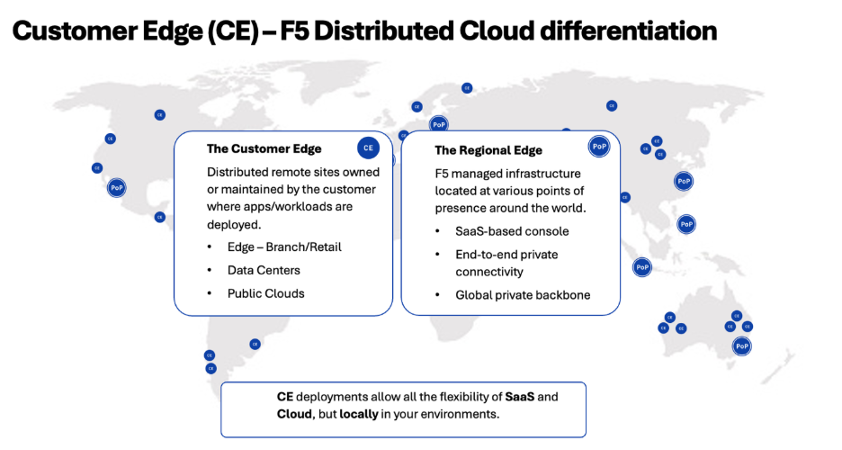
Figure: CE Differentiation
Architecturally, a CE is a full-stack L3–L7 networking appliance that unifies software-defined networking, application delivery, and security capabilities into a single deployable software package. It functions as an integrated networking, application delivery, and security enforcement engine across hybrid and multi-cloud environments, providing application-aware routing, load balancing, proxying, firewalling, web application firewall (WAF) and API security, and end-to-end observability. These capabilities are delivered through one software stack and operated using a single, consistent policy model, managed centrally through a SaaS based console.
Note: For more information on ecosystem support, see the reference guide.
Secure Mesh
This flavor of CE is a Layer 3-Layer 7 integrated high-performance networking stack that provides network connectivity, application connectivity, network security, and application security.
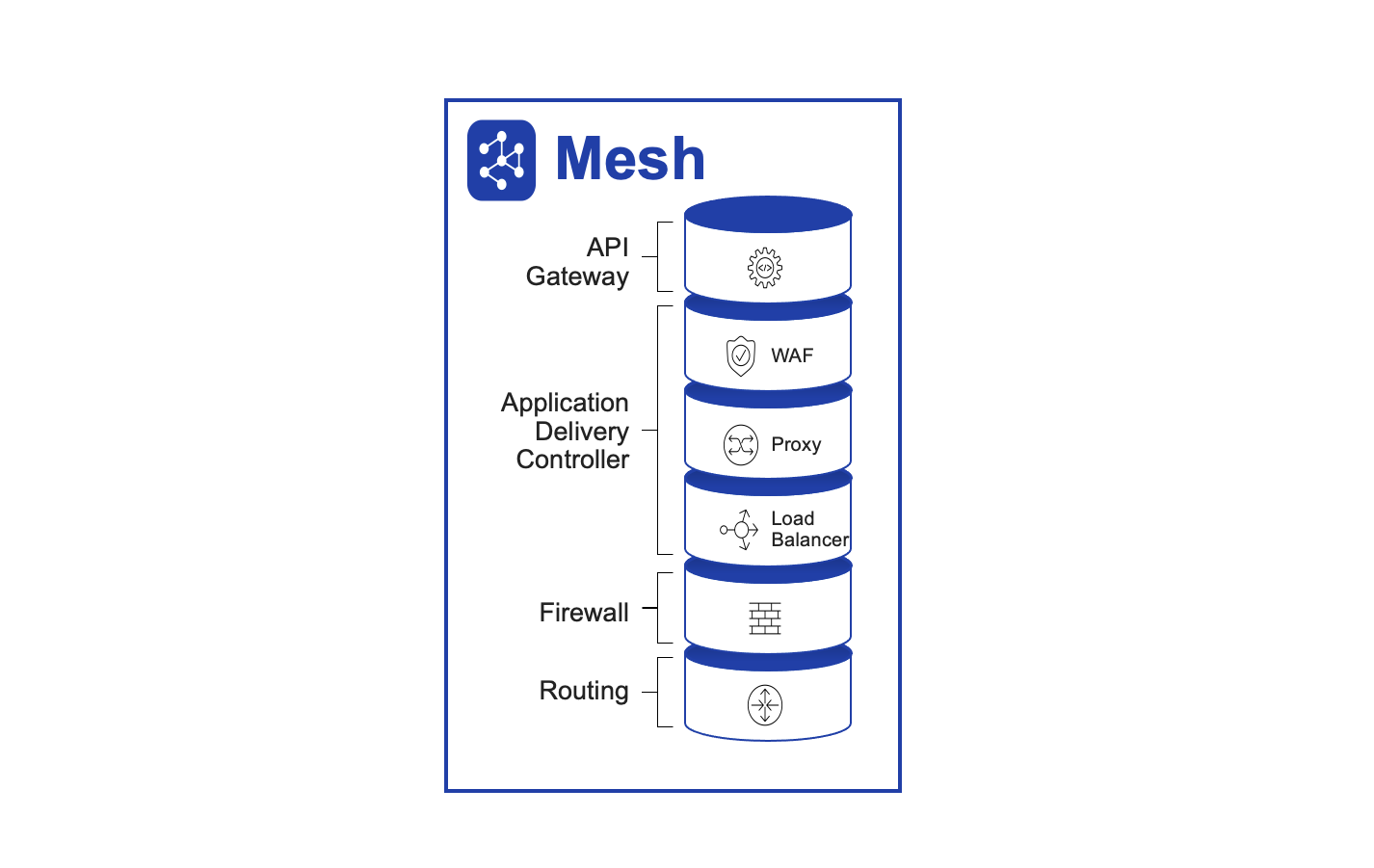
Figure: Secure Mesh CE
Secure Mesh network connectivity and security services include the following functions:
- Layer 3 routing
- Network segmentation
- IPsec connectivity to third-party devices
- Fabric connectivity (CE Site-to-Site connectivity)
- Connect networks directly or through source NAT (SNAT)
- Network ACLs and firewall policy
- BGP routing to advertise VIPs within Site
Secure Mesh application connectivity and security services include the following functions:
- Application and API security policy
- Forward proxy
- Load balancer
- Web application firewall
- API and service discovery
App Stack
This flavor of CE is a managed Kubernetes application hosting stack that allows you to deploy, secure, and operate a fleet of applications across the distributed infrastructure such as public clouds, on-premises data centers, or edge. It can scale to many clusters and locations with centralized orchestration, observability, and operations to reduce the complexity of managing a fleet of distributed clusters.
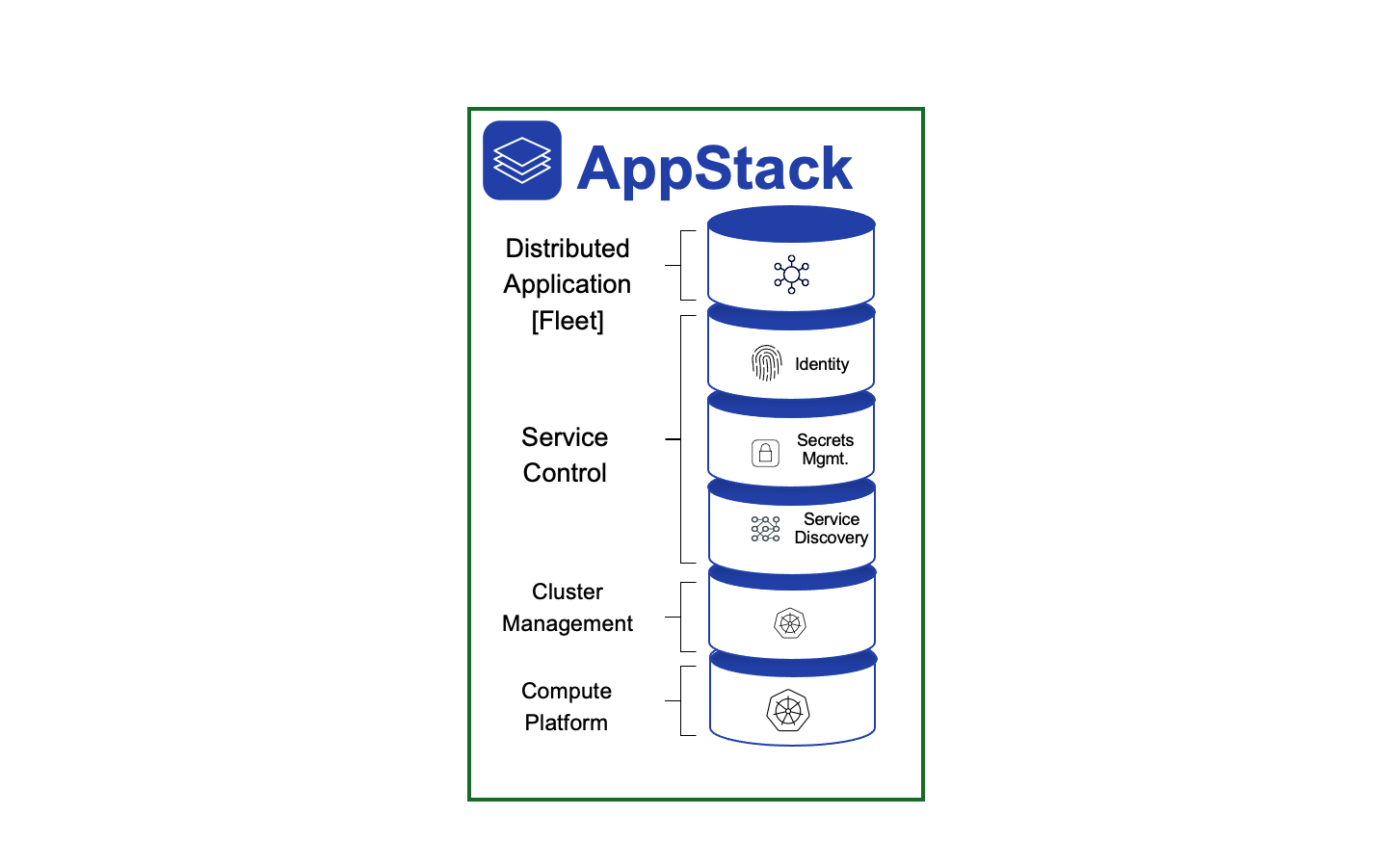
Figure: App Stack CE
App Stack Distributed Application Management services include the following functions:
- Distributed Infrastructure Management
- Continuous Deployment and Verification
- Identity and Secrets Management
- Distributed Application Management
- Service Discovery
- Cluster Management
CE Software Architecture
A CE is made up of a cluster of one or more nodes, which can be scaled up or down based on load by adding or deleting nodes. Each node is a Linux-based software appliance (appliance is delivered as ISO or deployment spec on K8s) that is deployed in a virtual machine, in a Kubernetes cluster, commodity hardware, or F5 edge hardware.
High Availability with Three Nodes
All software components within CE have a microservices-based architecture. These are deployed as Kubernetes pods/services and use ETCD to store all data, such as configuration data, state, and metadata.
ETCD is a distributed key-value store. For production deployments that require high availability, ETCD must be run as a cluster of multiple nodes. This ETCD cluster needs a quorum to agree on updates to the cluster state. For a cluster with n members, quorum is (n/2)+1. Therefore, a failure tolerance of one (1) requires a cluster of three (3) nodes. This is the reason that F5 recommends a minimum of a three-node deployment for high availability.
CE Deployment Model
For any CE, there are two deployment models supported.
Single-Node
This deployment model is recommended only for test or POC purposes. As the name suggests, in this model, only a single instance of Secure Mesh software is deployed in a virtual machine or bare metal.
Multi-Node
This deployment model is recommended for production. A three-node cluster is recommended because it provides high availability. In this model, Secure Mesh software is deployed on three separate nodes and is clustered to operate as a single CE Site. In case of cloud sites, it is recommended to deploy each node of a CE in a separate availability zone (AZ).
Note: For better policy enforcement and larger bandwidth requirements, you can logically group multiple single-node CE sites into a virtual site construct.
CE Registration
For the CE to come up successfully and provide its intended services, it first needs to register itself with F5 Distributed Cloud Global Controller. For this to be a zero-touch provisioning, the tenant user must generate a token when following Site creation workflow. This token must then be inserted into the VM as part of cloud init or given as part of the deployment spec on launching on k8s.
When the node's software boots up, it is expected to call home to register. For the call home to succeed, there must be at least one interface up with connectivity to the centralized control and management service - this interface is dynamically identified and configured during bootstrap. During call home, the node sends a registration request with the token to identify the tenant and any additional information about the node. For example, this includes hardware info, and more.
CE-RE Connectivity
When a CE is registered successfully, the F5 Distributed Cloud Global Controller automatically selects two Regional Edges (REs) based on the GeoIP proximity of the public IP address with which the CE registration was received. Optionally, you can also specify which REs you want the CEs to connect to during CE creation. The location of the RE is determined based on geo-proximity using the public address, and the closest RE is connected to it.
Once these REs are selected, the list of two selected Regional Edges is passed down to the CE as part of the registration approval process. Also, the following additional information is sent as part of this approval:
- CE identity and PKI certificates: These certificates are regularly rotated by the system.
- Initial configuration to create and negotiate secure tunnels for the F5 Distributed Cloud.
The CE will try to negotiate both IPsec and SSL tunnels to the selected REs.
Note: IPsec is the preferred approach and will fall back to SSL if IPsec cannot be established. Once connectivity is established, a secure network fabric is established and a distributed control plane in the RE takes over control of the CE. These tunnels are used for management and control, as well as for data traffic (if you require it). Site-to-Site traffic and Site to-public traffic go over these tunnels. However, the data traffic is under your control. You can leverage the F5 Distributed Cloud global network or route Site-to-Site traffic over the directly established tunnels.
CE Performance and Scale
F5 suggests that you contact your F5 account manager to get more insights into the recommended CE node sizes (for on-premises) and instance flavor (for public cloud environments) for your setup and performance reports.
You can learn more about the minimum requirements for CE deployments across supported platforms. This can help you get an informed estimate of the system requirements according to their features, scale, and performance needs. Refer to the Customer Edge Site Sizing Reference guide for the scale limits.
Getting Started
- CE Datasheet
- Customer Edge Ecosystem Support
- Customer Edge Site Sizing Reference
- Create Secure Mesh Site v2
- Customer Edge Registration and Upgrade Reference
- Secure Mesh Site FAQs
- F5 Distributed Cloud - Customer Edge Site - Deployment & Routing Options